...
Those URLs are resolved to various changing IPs. The server may either directly fully access those services (for details check at AWS the IP scopes of the S3 service) or the server can use a proxy server having those internet access possibilities.
In case you use a proxy server (only then):
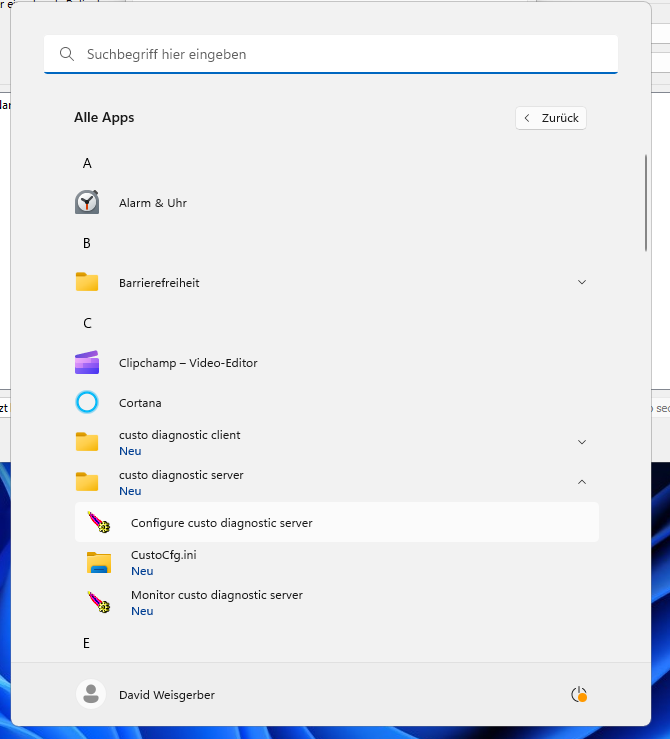
Open the "Configure custo diagnostic server" -Programm program and stop the custo diagnostic server service in the general "General" tab:
Then go to the "Java" tab:
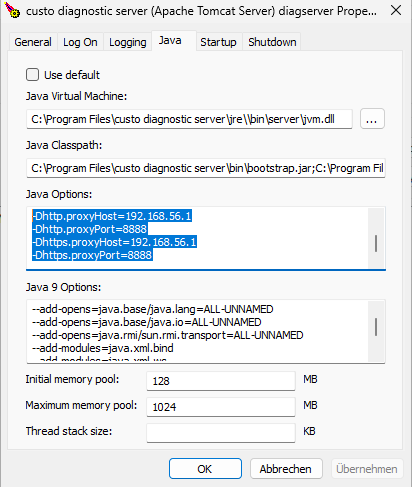
Enter the following lines:
...
Afterwards go back to the general tab and start the service again.
Certificate trust
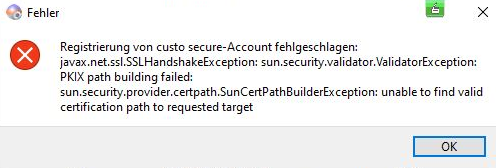
The custo diagnostic service server (sending practice as well as evaluation center) must trust the certificates of the custo secure AWS service. In most cases this will be the case by default. However, in some cases this may not be the case with an error like the one below:
Log on the server computer where the custo diagnostic server service is installed installed:.
Open the management console "Computer Certificates" and navigate there to the stored "Trusted Root Certificates" store. Make sure that the certificate "Amazon Root CA 1,O" is present.
If not right click on "Trusted Root Certificates" and select the import option. You will get the file "you have to download the certificate "Amazon Root CA 1" (File: "AmazonRootCA1.cer", Distinguished Name: "CN=Amazon Root CA 1,O" =Amazon,C=US") from here: https://www.amazontrust.com/repository/.
Than you have to import the downloaded certificate to the "Trusted Root Certificates" store. You can right click on the certificate file and select "Import" or import the certificate in the certificate store management tool as well.
Review if there are any older expired certificate of Amazon Root CAs in the trusted root certificate store. If so remove them.
Afterwards reboot the operating system of the servercomputer.
Evaluation center setup
Evaluation center account
...