Introduction
This article describes how you can move an existing MariaDB custo diagnostic database to another DB host computer.
Moveing the Database
To move an existing database you can use the "Database Converter" as descibed in this article.
Preparation
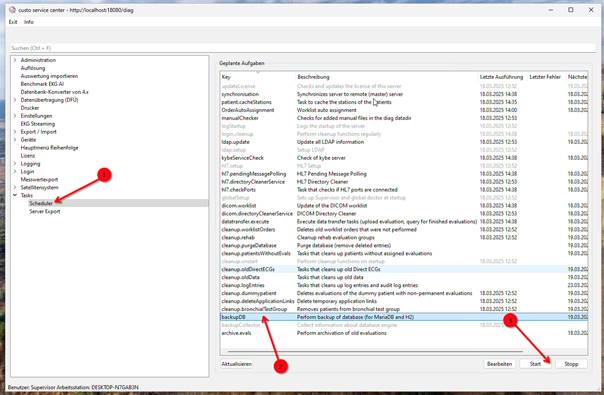
- First create a database backup by running the database backup task in custo service center:
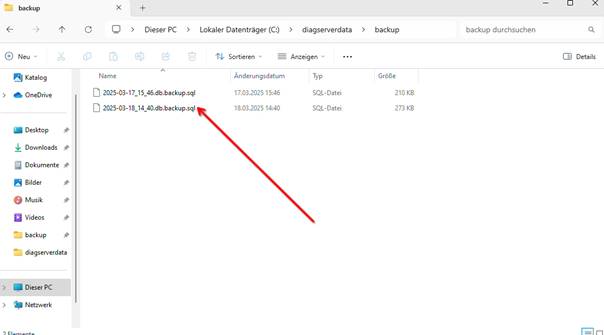
- Wait a few minutes until the backup is complete. You'll now find a current .sql file in the "diagserverdata\backup" subdirectory:
7. Install custo diagnostic server on the target computer and select the newly created diagserverdata directory as data directory.
8. Make sure that the newly installed server is up and running with a custo diagnostic client, but do not be surprised about missing data (will only come back with the next steps).
9. Close the custo diagnostic clients and service centers.
10 Open a Windows CMD shell as administrator and run
Command
|
But the service "diagserverdb" (i.e. MariaDB) must still be running!
Now you can import the backup file with the following command to overwrite the database with the backup. For this we need the password for the database. You will find the password in the file "conf\diag.properties" located in the custo diagnostic server installation directory. This file contains the entry diag.dbPass=[...]. The password is the characters after the "=".
We first change to the directory with the backup files. Than execute the mysql command located in the installation directory of the custo diagnostic server below "mariadb\bin".
Command
|
Make sure that you use here the file name which is the most recent backup you crearted before the data copy.
Example
|
This would bring back the backup from DD.MM.YYYY. Please replace this with the filename with the backup you will have to restore. Please note:
- The password comes after -p but without spaces!
- The user comes after -u without spaces and is always root
- After the password comes the name of the database, which is called diagdb
Afterwards you can start the custo diagnostic server:
Command
|